Rain Gauge & Dark Sky Tech
- 3.9
- Rating
- 100.00K
- Installs
- Free
- Price
 Analysis by App-foxy
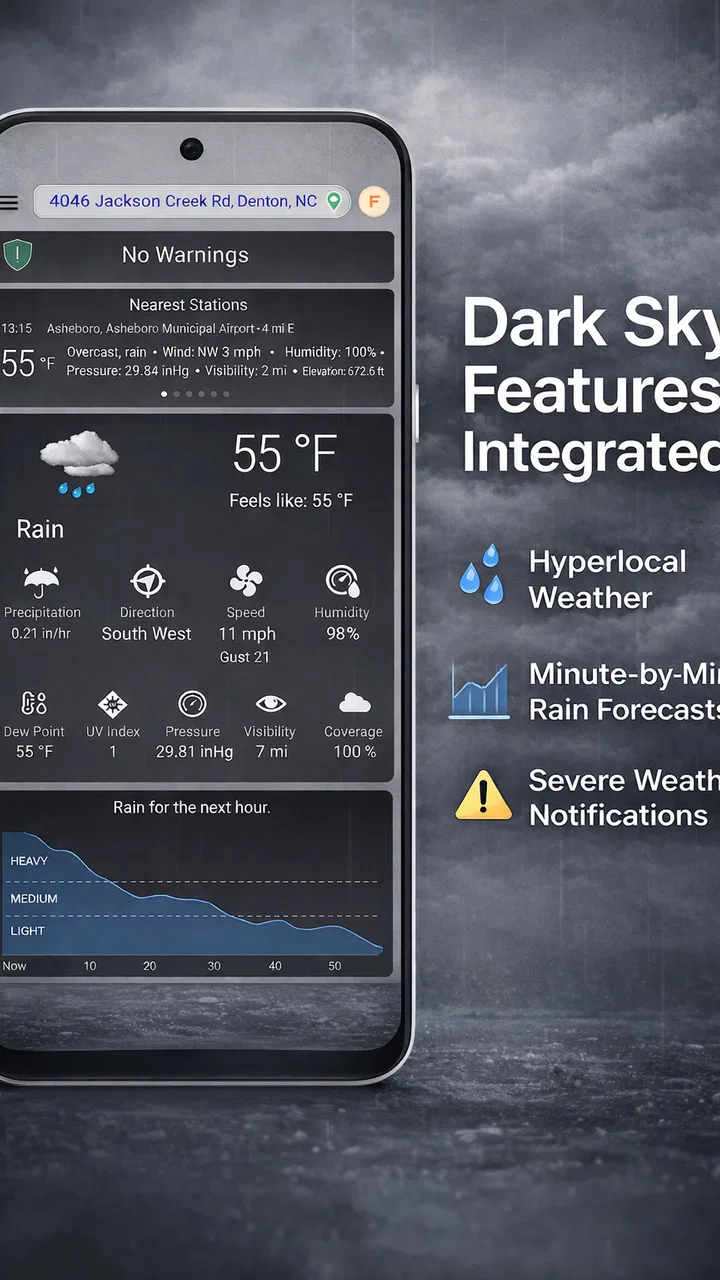
I noticed Rain Gauge & Dark Sky Tech because it approaches weather from a more practical angle than the usual “what will the sky look like today?” forecast. Its focus is rain: what has already fallen, how much fell yesterday, and whether a shower is likely to arrive soon. After using it as a weather companion rather than a complete replacement for every forecast tool, I found its appeal fairly clear. It is most useful when rain itself affects a decision, such as walking, gardening, commuting, washing a car, or checking whether outdoor work can continue.
The app is free to start, is suitable for Everyone, and comes from Hyperlocal Weather App. It has reached over 100 thousand installs and holds a 3.9 average from around 8 thousand ratings, with roughly 1.9 thousand written reviews. Those figures suggest a real audience, but they also hint at an important point: this is a focused utility, not the kind of weather app that automatically becomes essential for every person.
From an interesting first week to a useful weather habit
During my first week, the most appealing part was the narrow purpose. Instead of forcing me to interpret a broad forecast full of temperatures, wind, humidity, and several icons, the app encourages a direct question: how wet was it, and how wet is it likely to become? That simplicity makes the first few checks feel quick. If rain is the only thing I care about before leaving home, a dedicated rain gauge can be more convenient than opening a general-purpose weather service and searching through several panels.
You May Also Like

 Blood Strike: 2.5 Anniversary
Blood Strike’s Loadouts Turn Every Drop Into a Tactical Gamble
A close look at Blood Strike’s custom loadouts: how fast access to signature weapons reshapes its battle royale rhythm, rewards preparation, and narrows the gap between fights.

 Pandora - Music & Podcasts
Pandora’s Music Is Easy to Start, but Harder to Recover
Pandora’s strength is its low-effort path from a seed to a station. Its weak spot is how much confidence it asks you to place in connection, setup, and quiet recovery.

 8 Ball Pool
 Is Built on Rivalries, Rematches, and Routine
A close look at the rivalries, rematches, shared routines, and unanswered safety questions that turn a quick pool match into a persistent mobile community.

 Samsung Music
’s Quiet Strength Is Playing What You Already Own
Its reach comes less from spectacle than from dependable access to a personal library. That simplicity is both the app’s strongest retention engine and its ceiling.

 AccuWeather: Weather Radar
AccuWeather Review: A Quick, Clear Forecast for Everyday Decisions
For everyday plans, the best forecast is the one you can understand quickly. AccuWeather makes rain timing, radar, and local conditions easy to act on, with a few trade-offs.

 Hill Climb Racing
Why Hill Climb Racing Still Turns Crashes Into One More Run
A tiny car, a bumpy hill and one more upgrade: Hill Climb Racing keeps resurfacing because its simple chaos makes every near-miss feel personal.
More From Our News Desk



The historical angle is particularly practical. Yesterday’s rainfall is easy to underestimate, especially after a night of steady showers or when water has already drained from pavements and driveways. Checking a rainfall total can help me decide whether plants need watering, whether a muddy route is likely to remain unpleasant, or whether a planned outdoor task was already helped by natural rain. It turns the app from a purely predictive tool into something that also helps me understand what actually happened.
The minute forecast is another reason the app can feel valuable immediately. A broad hourly forecast may say that rain is possible during the morning, but that is not always enough when I am deciding whether to leave now or wait a little. A short-range view is more relevant when I am standing by the door with a bag, preparing to walk the dog, or trying to fit a quick errand between showers.
I would not treat that minute-by-minute information as a promise. Very local rain can change quickly, and a forecast can be less useful when a shower develops nearby rather than moving in from a predictable direction. The right way to use it is as a timing aid, not as a guarantee. That distinction matters because the app’s focused design may encourage confidence precisely when the weather is changing fastest.
Why the rain-drop approach feels different
Many weather apps make rain one small part of a crowded screen. Here, rainfall is the main subject. That gives the app a clear identity and makes it easier to build a routine around one question. I can imagine checking it before a morning run, then again before a late-afternoon journey, without scrolling past information that does not affect the decision.
There is also a useful psychological difference between looking at a forecast and looking at a recent rainfall record. A forecast tells me what might happen; a rainfall total gives me a concrete way to judge the last event. Over time, that can improve my own sense of local conditions. If the app shows that rain was heavier than it appeared, I may stop relying only on what the pavement looks like. If the total was small, I may understand why a garden still needs attention.
One of my favorite practical workflows is to use the app after a rainy night rather than before it. I can check the accumulated amount, compare it with what I expected, and then make a better choice about watering or outdoor work. That is a less obvious use than simply checking whether an umbrella is needed, and it gives the application a reason to remain installed after the initial novelty fades.
Who gets the most value from it
This app makes the most sense for people whose plans are sensitive to precipitation. Gardeners, walkers, cyclists, dog owners, outdoor workers, parents arranging school journeys, and anyone managing a property can all benefit from a rain-centered view. It is also interesting for people who live in places where showers are highly localized and a general city forecast often feels too broad.
It is less convincing for someone who wants a full weather dashboard. If I need detailed long-range planning, a wide selection of atmospheric information, or a single screen covering every possible weather variable, a conventional weather app may be a better primary tool. Rain Gauge & Dark Sky Tech works best beside that kind of service, or as a replacement only when rainfall is genuinely the main concern.
The age rating of Everyone makes it approachable for households, but simplicity should not be confused with universal usefulness. A child may understand the rain-focused display quickly, while a serious outdoor planner may still want another source before making an important decision. The app’s strength is its narrowness, and that same narrowness defines its limits.
What remains useful month after month
The harder test for any small utility is whether I still open it once the first-week curiosity has gone. In this case, lasting value depends on having recurring rain-related decisions. If I regularly check whether a garden needs water, whether a path will be slick, or whether a trip can be delayed until a shower passes, the app can settle into a dependable habit. If rain rarely changes what I do, it may become an occasional novelty.
The most sustainable habit is to attach the app to an existing decision rather than opening it randomly. For example, I would check yesterday’s rainfall before watering plants, then use the short-term outlook before scheduling outdoor work. That two-step routine gives the historical and predictive sides separate jobs. It also prevents the app from becoming just another forecast screen that I glance at without acting on.
For commuters, the practical routine is slightly different. A quick check before leaving can help decide between walking, cycling, public transport, or taking extra protection. The value is not that the app eliminates uncertainty; it is that it puts rain timing at the center of the decision. On days with scattered showers, that focus may be more useful than a temperature-first layout.
People who keep a garden can use rainfall totals as a memory aid. Instead of trying to remember whether yesterday’s rain was substantial, I can check the record and make watering decisions with more consistency. This does not turn the app into a complete gardening system, and I would still consider soil type, plant needs, and local conditions, but it offers a helpful piece of information that is easy to overlook.
Another long-term use is reviewing patterns around repeated outdoor tasks. If I check the app before washing a car, painting, exercising outside, or planning a small event, I gradually learn when its short-range guidance is most helpful in my area. That personal familiarity is more valuable than treating every forecast as equally precise. The app becomes a tool I understand, not merely an icon I tap.
How it compares with ordinary weather apps
A standard weather app is usually the better all-rounder. It can cover temperature, wind, daily conditions, and broader planning in one place. For a holiday, a multi-day trip, or a decision involving heat and wind as much as rain, I would prefer that wider view. Rain Gauge & Dark Sky Tech does not need to beat those apps at everything; its case is that a specialized rain view can be faster and more relevant for certain decisions.
Compared with checking a general forecast, the app’s rainfall history is a meaningful difference. Many people remember rain as a yes-or-no event, but the amount matters. A brief drizzle and a night of persistent rain can leave very different conditions behind. Having rainfall totals visible gives me a better basis for judging what the weather actually did rather than relying on memory.
Compared with a simple rain radar, the app’s appeal is likely to be convenience and interpretation rather than a map-based overview. A radar can be excellent when I want to watch a weather band approach, but it may require more attention and context. A rain gauge-style tool is easier to consult when I want a quick answer. The trade-off is that users who enjoy tracking movement visually may find a dedicated gauge less engaging than a radar service.
The app’s free entry point also makes experimentation easy. I can install it, test whether rainfall information changes my decisions, and remove it if it does not earn a place in my routine. There are in-app purchases ranging from $1.99 to $99.99 per item, so I would pay attention to what is offered before committing to anything. The free starting point is attractive, but the presence of optional purchases means the long-term value should be judged by actual use rather than by the initial download alone.
Maintenance, friction, and sources of fatigue
A focused weather app should require very little maintenance, and that is one of its potential advantages. I do not want to manage a complicated dashboard just to know whether rain recently fell. The best routine is to keep the app available for specific checks and avoid turning every weather decision into a research session.
Still, any rain-focused tool can become tiring if I open it repeatedly without a clear purpose. Checking the minute forecast every few minutes will not necessarily improve a decision, especially when conditions are unstable. I found it more sensible to check once before leaving, then again only if plans change or the sky develops differently from expected. That small discipline keeps the app useful instead of turning it into a source of unnecessary uncertainty.
Another possible frustration is the gap between local reality and a displayed estimate. A shower can miss one street while soaking another, and a rainfall total may describe a nearby observation point rather than the exact patch of ground outside my door. I would therefore use the app alongside common sense: look outside, consider the route, and remember that a precise-looking number is still an interpretation of local weather information.
This is also why I would not use it as the sole basis for safety-critical plans. Outdoor events, travel in severe conditions, or work that depends on reliable weather information deserve broader checking. The app is well suited to everyday convenience, not to replacing judgment when the consequences of a wrong call are serious.
The developer, Hyperlocal Weather App, has chosen a clear concept, but a clear concept can make missing breadth more noticeable. Once I understand the rain gauge and minute forecast functions, I may want more context about wind, temperature, or longer-range conditions. If those details matter to me, I will probably keep a general weather service installed as well. That is not a failure of this app; it is the natural trade-off of specialization.
Small habits that improve the experience
Check the rainfall total before watering rather than assuming that visible wet ground means plants received enough moisture.
Use the minute forecast to choose a departure window, but leave a buffer when a trip cannot tolerate a sudden shower.
Compare the displayed conditions with what happens locally over several uses before trusting the app for tight scheduling.
Keep a broader weather source for wind, temperature, extended planning, and situations where rain is only one part of the decision.
These habits also answer a question many users have after installation: should this replace the weather app already on the phone? In my view, usually not immediately. I would first use Rain Gauge & Dark Sky Tech for a week of real rain-related decisions. If it consistently gives me information I act on, it may become my first choice for those moments while the general service remains available for everything else.
Another practical question is whether the app is worthwhile for people who do not garden or spend much time outdoors. It can still help with commuting, errands, exercise, and household chores, but the benefit will be more occasional. Someone who mainly wants tomorrow’s temperature may not notice enough difference to justify a dedicated installation. The app earns its place when rainfall changes plans often enough to deserve its own shortcut.
Does it earn permanent space?
After the novelty fades, I think the answer depends on whether the user values rainfall history as much as rain prediction. The short-range forecast is immediately understandable, but the record of what already happened is what gives the app a more durable purpose. It helps me make better follow-up decisions instead of merely telling me to carry an umbrella.
I also appreciate that the app does not need to be opened constantly to be useful. A few deliberate checks tied to watering, travel, exercise, or outdoor work are enough. That low-maintenance pattern is healthier than treating it as an endless stream of weather updates. If I can open it, answer a practical question, and move on, it has done its job well.
There are clear reasons to skip it. I would not choose it as my only weather resource if I need a broad forecast, detailed planning tools, or information beyond rain. I would also avoid relying on any minute forecast without allowing for local variation. Users who prefer a visual radar or a full weather dashboard may find a different app more satisfying from the beginning.
For everyone else, the free download makes the decision fairly easy: try it during a genuinely rainy period, not on a dry week when its main purpose cannot be tested. Pay attention to whether the rainfall totals change what you do and whether the short-term view helps you time real departures. That trial reveals more than a quick glance at the interface.
My lasting verdict is positive but specific. Rain Gauge & Dark Sky Tech earns permanent space when rain is a recurring practical problem, not merely an occasional curiosity. Its strongest contribution is the combination of recent rainfall awareness and immediate timing guidance. It will not replace a complete weather service for me, but as a focused companion from the Weather category, it offers a useful routine, a clear identity, and enough everyday value to remain installed when I use it with purpose.
FAQs for Rain Gauge & Dark Sky Tech
01What is Rain Gauge & Dark Sky Tech used for?
Rain Gauge & Dark Sky Tech is designed to help users monitor rainfall and check weather conditions in their area. It can be useful for planning outdoor activities, gardening, farming, commuting, or travel. The app combines rain-related information with weather data so you can get a clearer idea of what conditions may develop throughout the day.
02Does Rain Gauge & Dark Sky Tech provide accurate rainfall and weather forecasts?
The app can provide helpful rainfall measurements and forecasts, but its accuracy depends on your location, available weather stations, radar coverage, and the quality of the data sources it uses. Local conditions can change quickly, especially during storms. For important decisions, it is best to compare the information with official meteorological services and treat predictions as guidance rather than a guarantee.
03Does the app require location access to work properly?
Location access is generally important for Rain Gauge & Dark Sky Tech because rainfall readings and forecasts need to be matched to your current area. You may be able to enter a location manually, depending on the version and device, but automatic location detection makes everyday use more convenient. Review the requested permissions before installation and choose only the access level you are comfortable granting.
04Can I use Rain Gauge & Dark Sky Tech without an internet connection?
Most weather applications need an internet connection to download current rainfall observations, radar information, forecasts, and alerts. Some previously loaded data may remain visible temporarily, but it can become outdated when you are offline. If you plan to use the app while traveling or in an area with weak reception, check the forecast in advance and do not rely on cached information for changing weather conditions.
05Is Rain Gauge & Dark Sky Tech free to download, and are there advertisements or in-app purchases?
The availability of free features, advertising, subscriptions, or in-app purchases can vary by platform, region, and app version. Before downloading, check the Google Play Store or Apple App Store listing for the current pricing details. Also review the subscription terms carefully if premium tools are offered, since advanced forecasts, ad removal, alerts, or additional weather information may require payment.
Pros
- Simple interface makes rainfall data easy to understand at a glance.
- Useful precipitation history helps compare recent weather patterns.
- Dark Sky-style forecasts provide detailed local weather information.
- Rain measurements can support gardening and outdoor planning.
- Compact design keeps key weather tools accessible without clutter.
Cons
- Accuracy may vary depending on sensor quality and local conditions.
- Some advanced forecast features may require a paid upgrade.
- Location access can affect battery life when used continuously.
- Forecast reliability may decrease in areas with limited weather coverage.
- The interface may feel less useful without a nearby rain gauge.

Rain Gauge & Dark Sky Tech
Gallery